Invoices management
Overview
The Invoices section provides a centralized view of all generated invoices for your Storeino account. Key features include:
- Invoice Details: Displays invoice numbers, associated store URLs, subscription plans (e.g., Startup – Monthly), and creation dates.
- Status and Actions:
- Pay: A button to complete the payment for pending invoices.
- View: A button to view detailed invoice information.
This section ensures seamless management of billing by providing quick access to payment options and detailed records of all invoices.

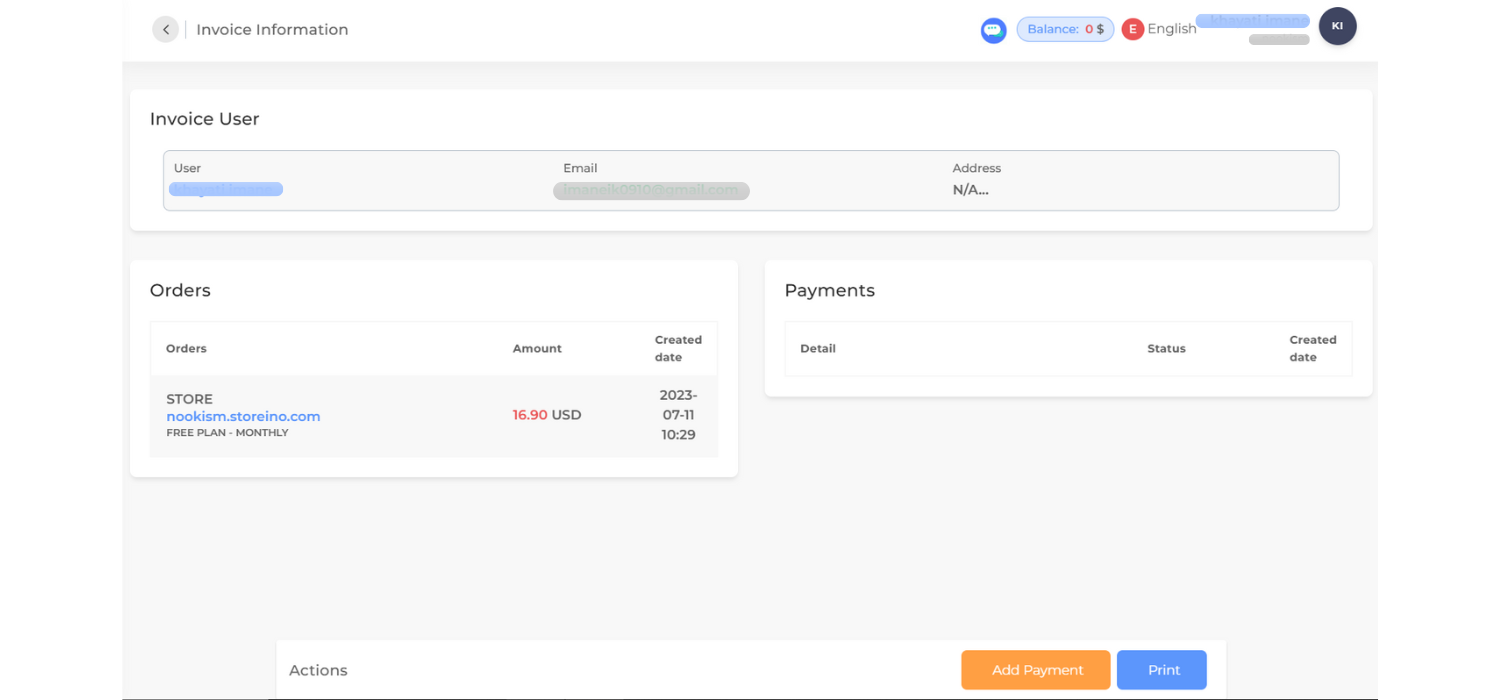
The Invoice Information page provides detailed data regarding a specific invoice. The key sections include:
- Invoice User:
- Displays user information such as:
- Name: Associated user.
- Email: User’s email address.
- Address: (if provided).
- Displays user information such as:
- Orders:
- Lists the orders linked to this invoice with:
- Store Name: Associated store or subscription.
- Amount: Total cost.
- Created Date: Date and time of order generation.
- Lists the orders linked to this invoice with:
- Payments:
- Includes details of payments associated with the invoice:
- Detail: Payment description.
- Status: Current status of the payment.
- Created Date: Date and time of payment.
- Includes details of payments associated with the invoice:
- Actions:
- Add Payment: Allows users to add a new payment for the invoice.
- Print: Generates a printable version of the invoice.